This Week in Breaker Labs: Pro Debut Boards, Trades and Spot Prices
· Breaker Labs
Pro Debut breaks get their own board this week: one spot per MLB team, with its minor league clubs right on the tile. Buyers can now trade spots with each other on stream, the board answers "How much for the Yankees?" for you, and Player Breaks adds hockey.
Pro Debut boards
A new board for minor league team breaks. It has one spot per MLB team, the way the Pro Debut checklist lists each minor league club under its MLB team, and each tile shows the team's logo over the minor league clubs that sell with it, Triple-A first.
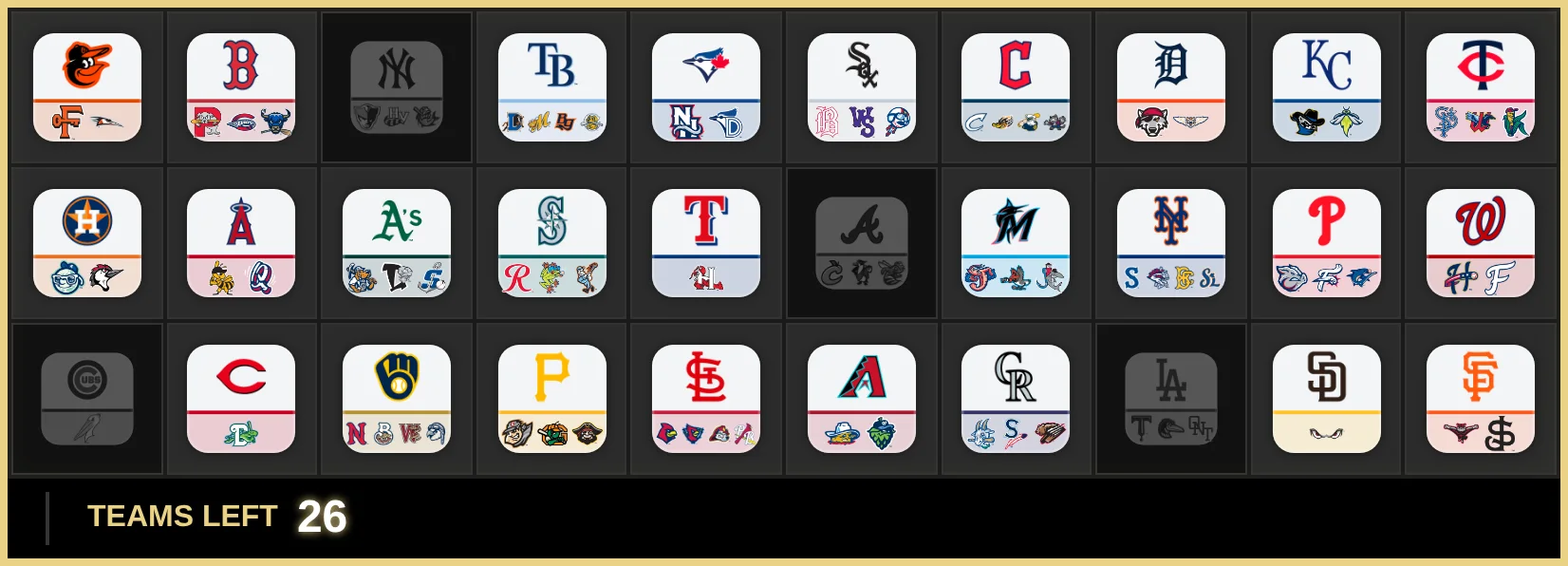
It starts with all 30 MLB teams and the 78 minor league clubs on the 2026 Topps Pro Debut Baseball checklist. Then it's yours: remove teams, add your own spots, or combine teams you sell together. Two or three combined teams share one tile with all their clubs on it.
Each tile already shows the team, so a Pro Debut board starts with no names under the tiles. Want them back? Every board you build yourself now has a Names under tiles switch, under Layout → Spots in the editor.
Find Pro Debut on the Sports tab when you create a board. It's a Pro feature.
Trades
Two buyers want to swap? Make the trade on the board. It works for any mix: 1 for 1, 2 for 1, 2 for 2.
In the Command Center, open Stream controls, go to Selling and select Trade. On a computer, or a tablet turned sideways, your board becomes the picker: tap the sold spots that are changing hands, check what each buyer gets in the bar under the board, and select Trade. On a phone or a narrower screen, you pick from a list of buyers and their spots.
Then the Trade Alert plays on stream. A panel names both buyers and what each one gets, the traded spots light up, and each buyer's name slides across to their new spots.
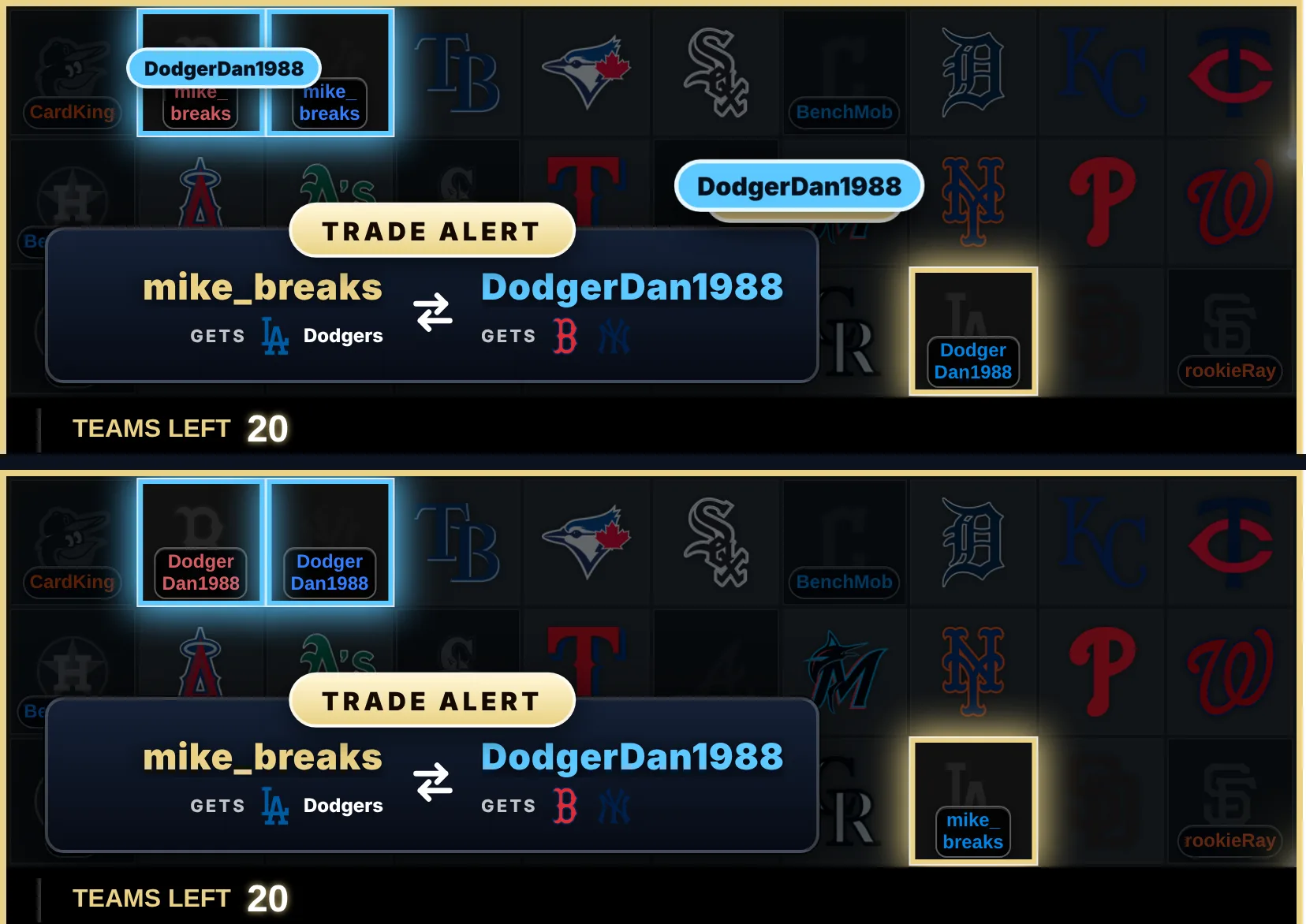
- Only the names move. The spots stay sold, so no takeover plays and the count doesn't change.
- Undo. Picked the wrong spot? Undo sits under the Trade button for two minutes after a trade, and puts the names back without an alert.
- Buyer names on. Trades swap buyer names, so Buyer names needs to be on in Selling. Trade turns on once two spots are sold, and a spot sold with no buyer name can't be picked.
Spot Prices
Every open spot can show its asking price, and every sold spot shows what the buyer paid. The price is on the card all break long, and it's in the takeover banner when the spot sells.
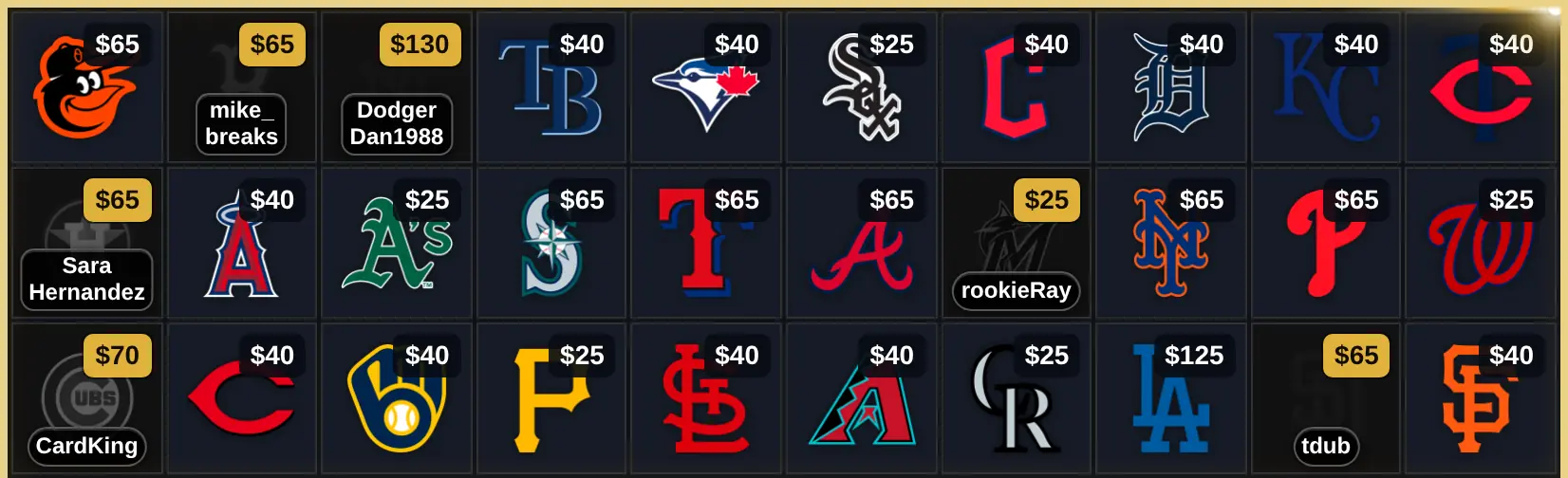
- Set your prices once. In the Command Center, open Stream controls, go to Selling and turn Spot prices on. Then select Set prices: type one amount for every spot, or give the chase teams their own price.
- Sell with Enter. When you sell a spot, the price box already holds its asking price. If the buyer paid that, type their name and press Enter.
- Big boards too. On a board with pages, like a player break, Find a spot asks for the price next to the buyer's name.
- Never cut off. On a small card, a price shortens instead of getting cut off: $12,550 becomes $12.5K, then $12K. It always rounds down.
- Ready for the next break. Reset board clears what sold and keeps your asking prices.
Pick the look in the editor under Cards & Claims → Spot Prices: a price tag or plain text, which corner, and whether to show asking prices, sold prices or both.
The Spot Prices post has the whole tour, and the step-by-step guide covers setup, fixing a price mid-break and switching currency.
Also new this week
- Hockey player breaks. Player Breaks now covers the NHL, with Upper Deck's 2025-26 and 2026-27 products, including Series 1 and 2, MVP, O-Pee-Chee, SP Authentic, Artifacts, Black Diamond and Tim Hortons. That makes four sports. The Player Breaks guide shows how to build one.
- Buyer names, exactly as typed. The Pill and Under logo looks, and the takeover banner, show the buyer's name exactly as it was typed, capitals and all. Before, every name was in capitals.
- Long names stay readable. On those two looks, a name that doesn't fit wraps onto two lines at a natural break (a space, an underscore, a number), or ends in "…". It no longer shrinks until nobody can read it.
- Bigger logos on divisional boards. Division tiles give the team logos more room, so an MLB division's five teams sit in one row, much larger than before.
Already in OBS? Reload the board once after the update so it picks up the Trade Alert and the new names. Select Reload in OBS on the widget in the Command Center, or open the browser source's properties in OBS and select Refresh cache of current page.
In case you missed it
A lot shipped since last week's roundup:
- A board for every break. Pokémon type breaks, player breaks built from the product's checklist, Bowman U school breaks, and a board you build yourself for box, pack and serial number breaks, with up to 1,000 spots a page at a time. The new boards post has all of them.
- Name Sync. Type a buyer once and the name lands on your Break Results board too, from a team board or the Randomizer Wheel. The Name Sync guide shows how to link them.
- Sunset Heist. A new theme with your logo on a neon sunset in the middle of the board. Every sale plays a getaway, sold spots get taped off, police lights hit the final stretch, and cash rains when you sell out. Find it in Customize → Themes.
- Types of card breaks, explained. New to the hobby, or explaining it to chat? This guide covers every kind of break and how each one works.
Getting started
Pro Debut boards, Trades, Spot Prices, Player Breaks, Name Sync and Sunset Heist are Pro features, included in the 7-day free trial.
Want something built next? Add it or vote for it on the Feature Requests page.