How to Build Your Own Break Board: Box, Pack and Serial Number Breaks
· Breaker Labs
Not every break is sold by team. Some breakers sell boxes, some sell pack numbers, some sell the last digit of a serial number, and some sell a list that's all their own. A custom board turns any of those into a live board for your stream, with the same sold tiles, takeovers and counter as a team board. For what each format is, see types of card breaks, explained.
This guide builds four kinds of custom board:
- a box break, where each buyer buys a box from a case
- a serial number break, where buyers buy a team and a digit
- a pack break or number break with hundreds of numbered spots
- a board from any list you paste in
Before you start
- Pro, or the 7-day free trial. Building your own board is a Pro feature.
- Your list of spots, if you're pasting one in: a spreadsheet column or a list from your notes works.
Step 1: Start a custom board
On your dashboard, select Create widget and choose Team Tracker. On What's the break?, open the Custom tab, choose Build your own board and select Continue.
Build your spots opens. There are four ways to add spots, and you can mix them on one board.
Step 2: Add your spots
Paste a list (box breaks and anything else)
Choose Paste a list and type or paste one spot per line. Colours and short codes fill in for you. Select Add spots.
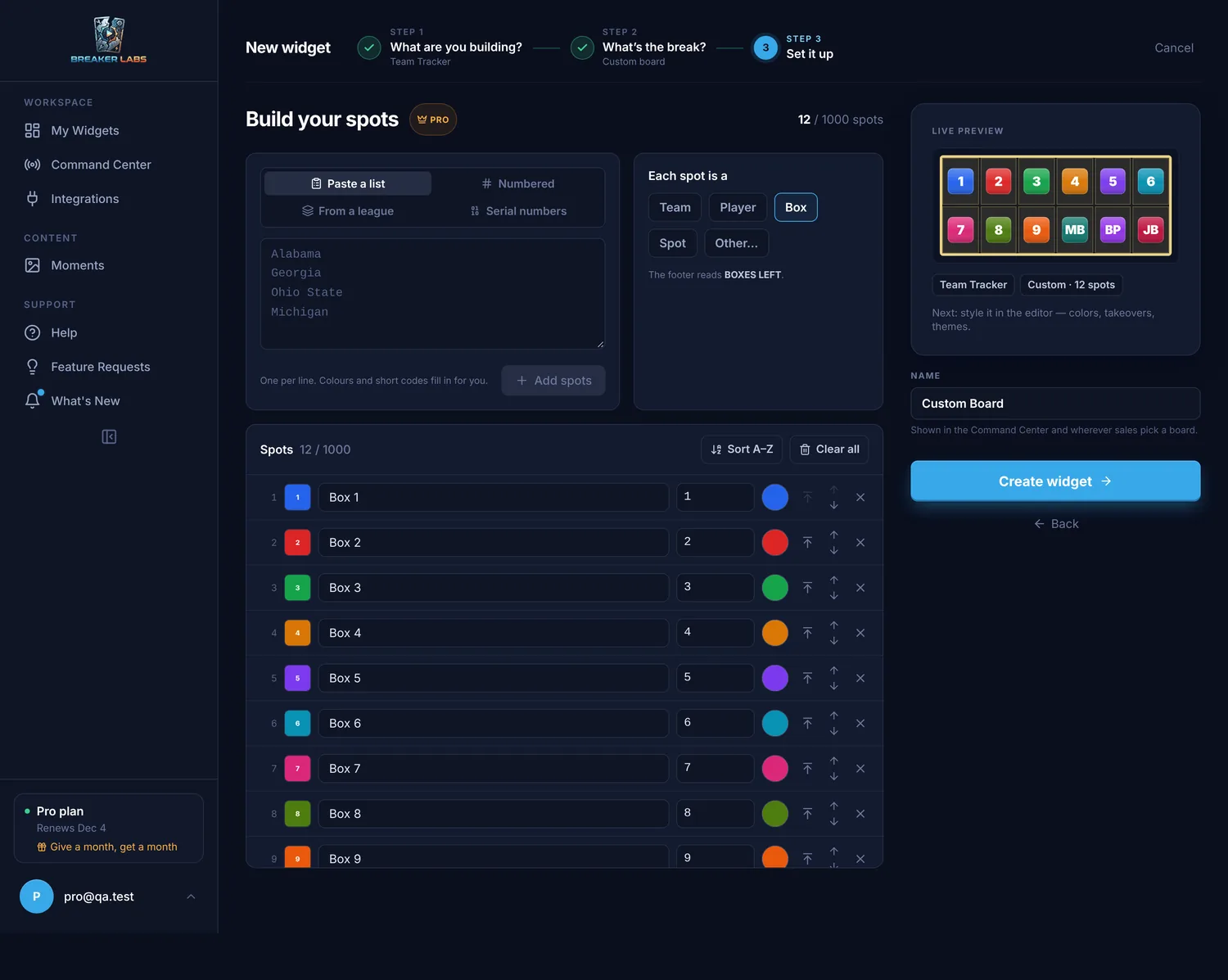
Use it for a box break (Box 1 to Box 12, or the box names), a list of characters, sets or card games, a player list for a product we don't have a checklist for yet, or anything else you sell.
Numbered (pack breaks and number breaks)
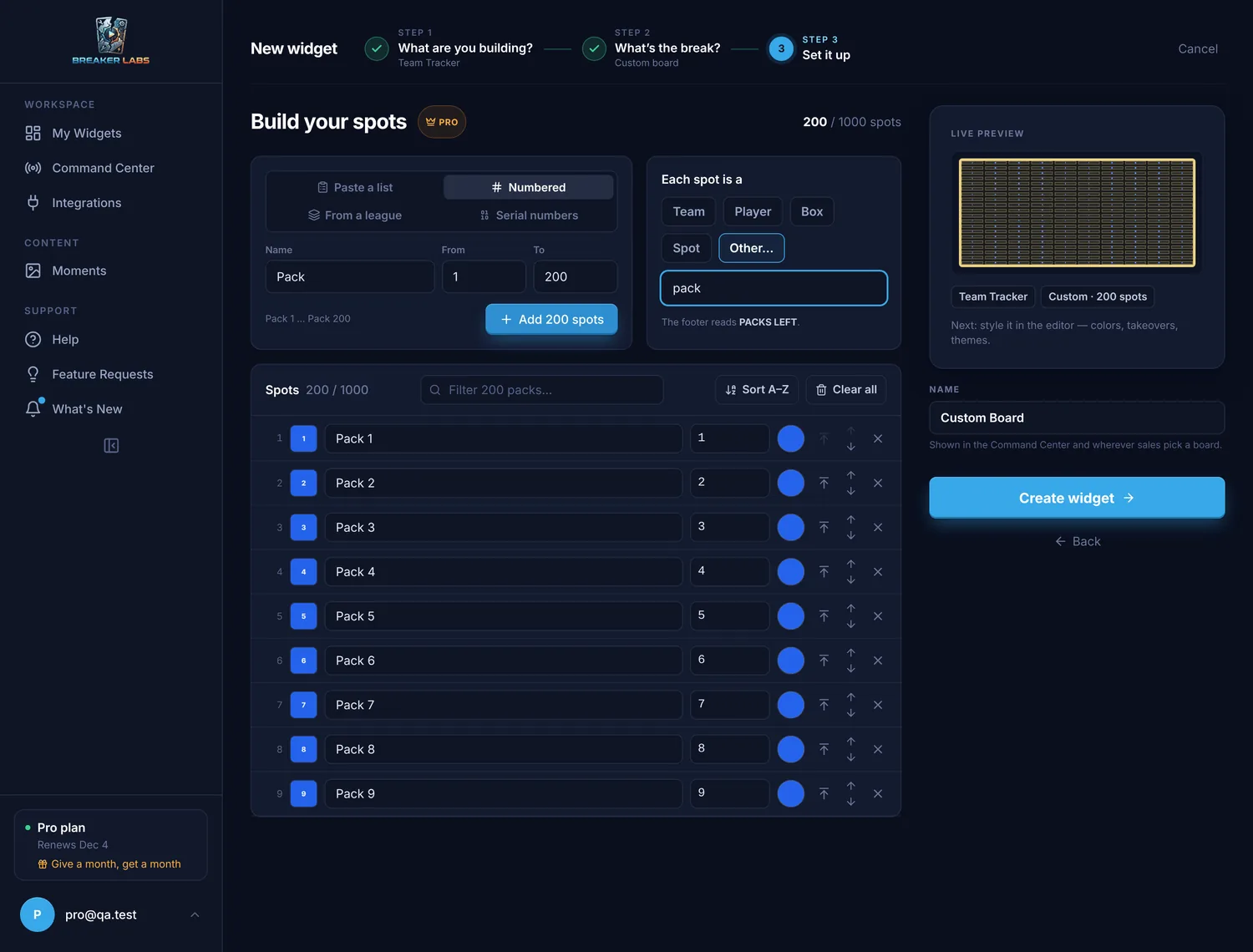
Choose Numbered, type a Name like Pack, and set From and To. One click adds the whole range: Pack 1 to Pack 200.
A numbered board shows each number big on its tile, all in one colour, and the counter carries the word: PACKS LEFT.
Serial numbers (serial number breaks)
In a serial number break, buyers buy a team and a digit, and win that team's cards whose serial number ends in their digit. A buyer of "NYY 7" gets every Yankees card numbered something like 27/99 or 107/150.
Choose Serial numbers, pick a league and the teams in the break, and choose the digits (0 to 9 for a full break). Each team gets its own row of digits. Once a team's digits are on the board, its chip shows a tick.
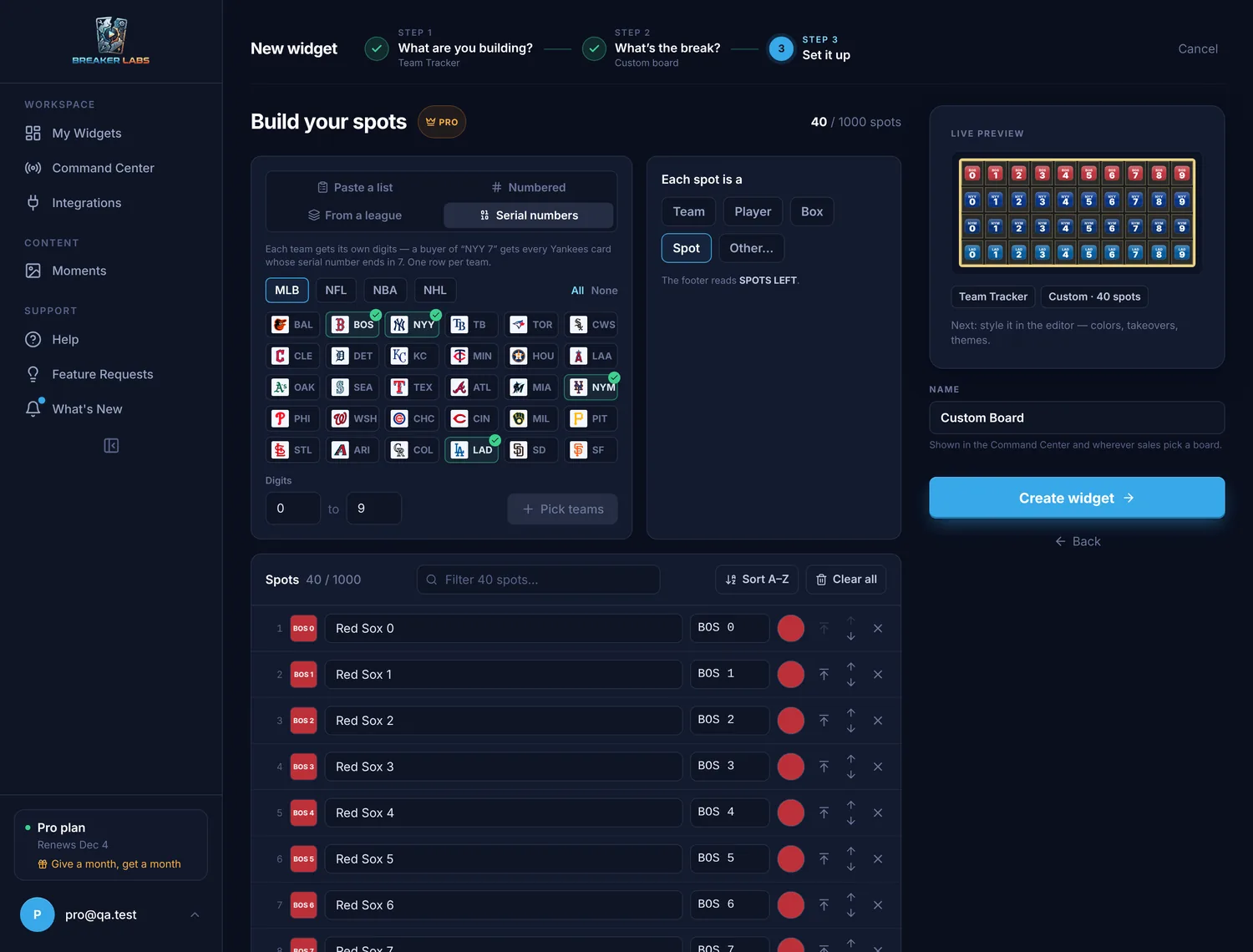
Four teams with ten digits each is 40 spots. The builder tells you the total before you add them.
From a league
Choose From a league to start with a league's teams, with their logos and colours. Then add your own spots on top with Paste a list: a mystery spot, a bonus box, a team from another league.
Upload pictures (your own logos)
Have a folder of logos? Choose Upload pictures and drop them in, or select the box to choose them. Each picture becomes a spot named after its file (ohio-state-logo.png becomes Ohio State), and a file named like a spot already on the board goes on that spot instead. Pictures can be PNG, JPEG, GIF or WebP, up to 2MB each.
Step 3: Name what a spot is
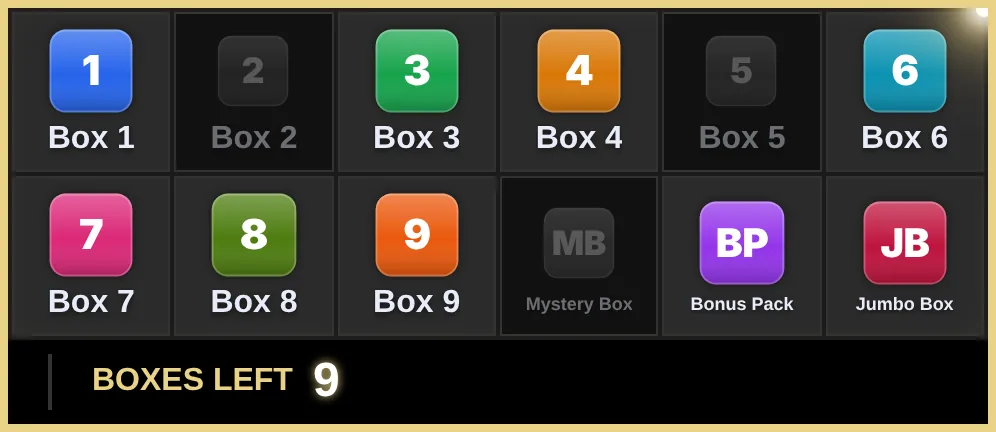
Under Each spot is a, choose Team, Player, Box or Spot, or choose Other… and type your own word, like pack, character or card. The board's counter uses it: a box break reads BOXES LEFT.
Step 4: Tidy up the list
Every spot has a row in the list:
- Name: what the tile and the takeover show, up to 40 characters.
- Short code: the letters on the spot's tile, like
B1. - Colour: the tile's colour.
- Picture: select the thumbnail to give the spot its own picture. Upload one, pick one you've already uploaded, or drop a file straight onto the row.
- Move to the top, move up, move down and remove.
On a board with more than a dozen spots, Filter finds a spot by name.
Spots from a league keep their team logos. Every other spot gets a tile in its own colour with its short code, so the board is never blank. On a serial board, each team's digits come in that team's colour.
Pictures count toward your uploads (100 on Pro), and the same file uploaded twice only counts once. The Uploads page in the sidebar shows which boards use each picture, lets you delete the ones you no longer use, and can replace a picture everywhere it appears.
Sort A–Z puts the list in alphabetical order, and Clear all starts again. A board holds up to 1,000 spots. When it looks right, select Create widget.
Step 5: Style the board and go live
The board opens in the editor. Colours, your logo, fonts, takeovers and the ticker all work as they do on a team board. Select Save, then add it to OBS: in the Stream Command Center, select Add to OBS. The OBS Direct Sync setup guide covers the one-time connection.
Here's the box break on stream, three boxes sold:
And the serial number break, one row per team:
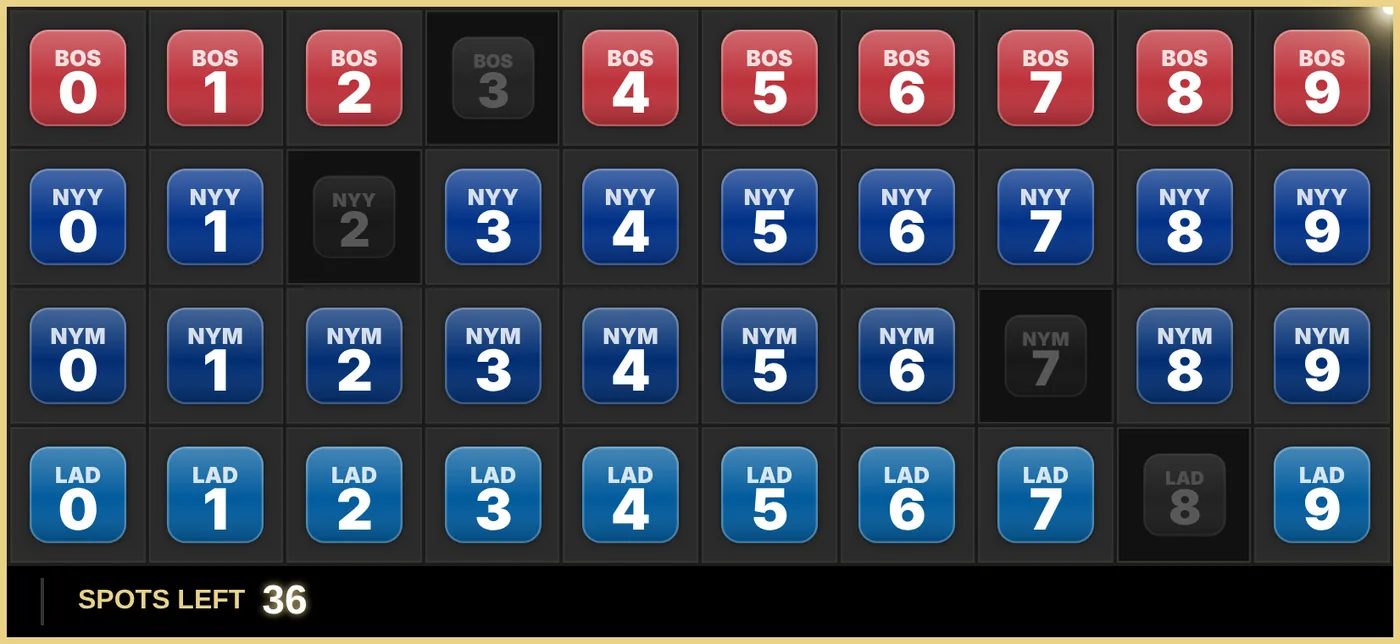
Sell spots from the Command Center the same way as on a team board: select a spot to mark it sold, and select it again to put it back. The takeover plays and the counter counts down.
Step 6: Show big boards a page at a time
200 packs won't fit on one screen at a size anyone can read. Boards with more than 100 spots start with pages on, so the board shows one page at a time.
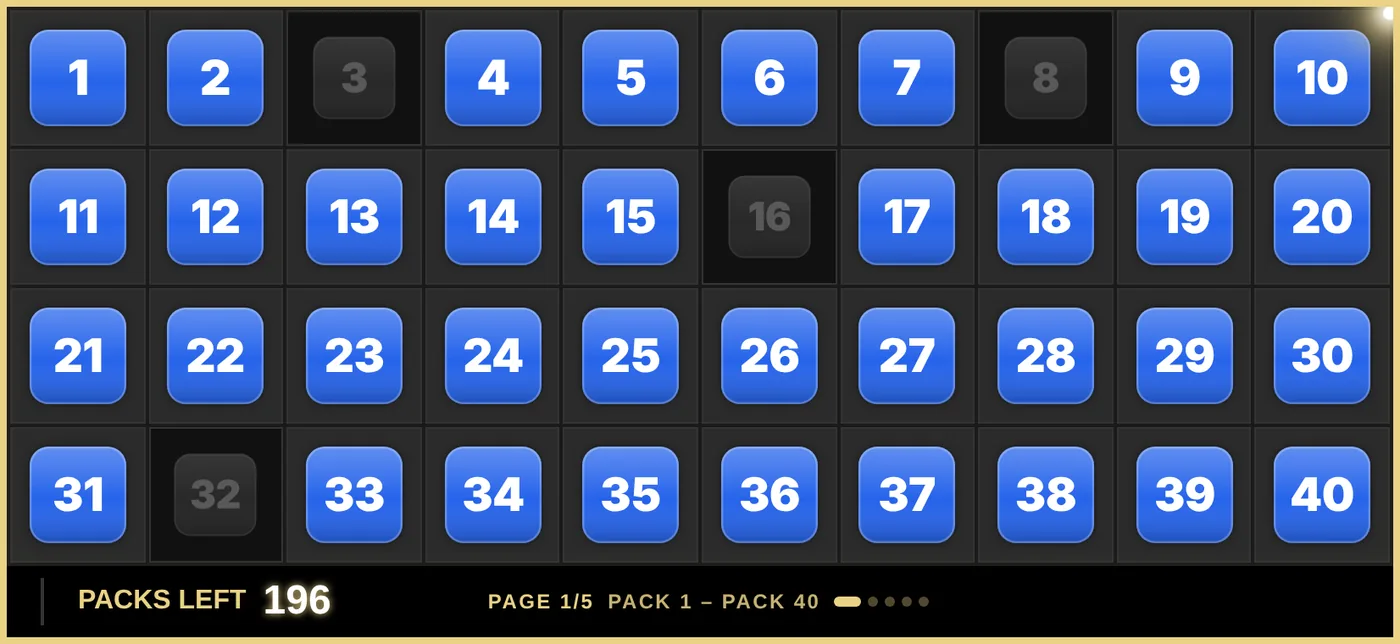
To turn pages on or off, or to change how they work, go to Layout → Pages in the editor and use Show one page at a time. In the Command Center, the board then gets page controls and Find a spot, so you can sell pack 173 without paging to it: type 173 and press Enter. The Player Breaks guide explains every page setting.
Step 7: Change the spots, even mid-break
Plans change: a box gets added, a team is spelled wrong, a spot is pulled. In the editor, go to Layout → Spots and select Edit spots.
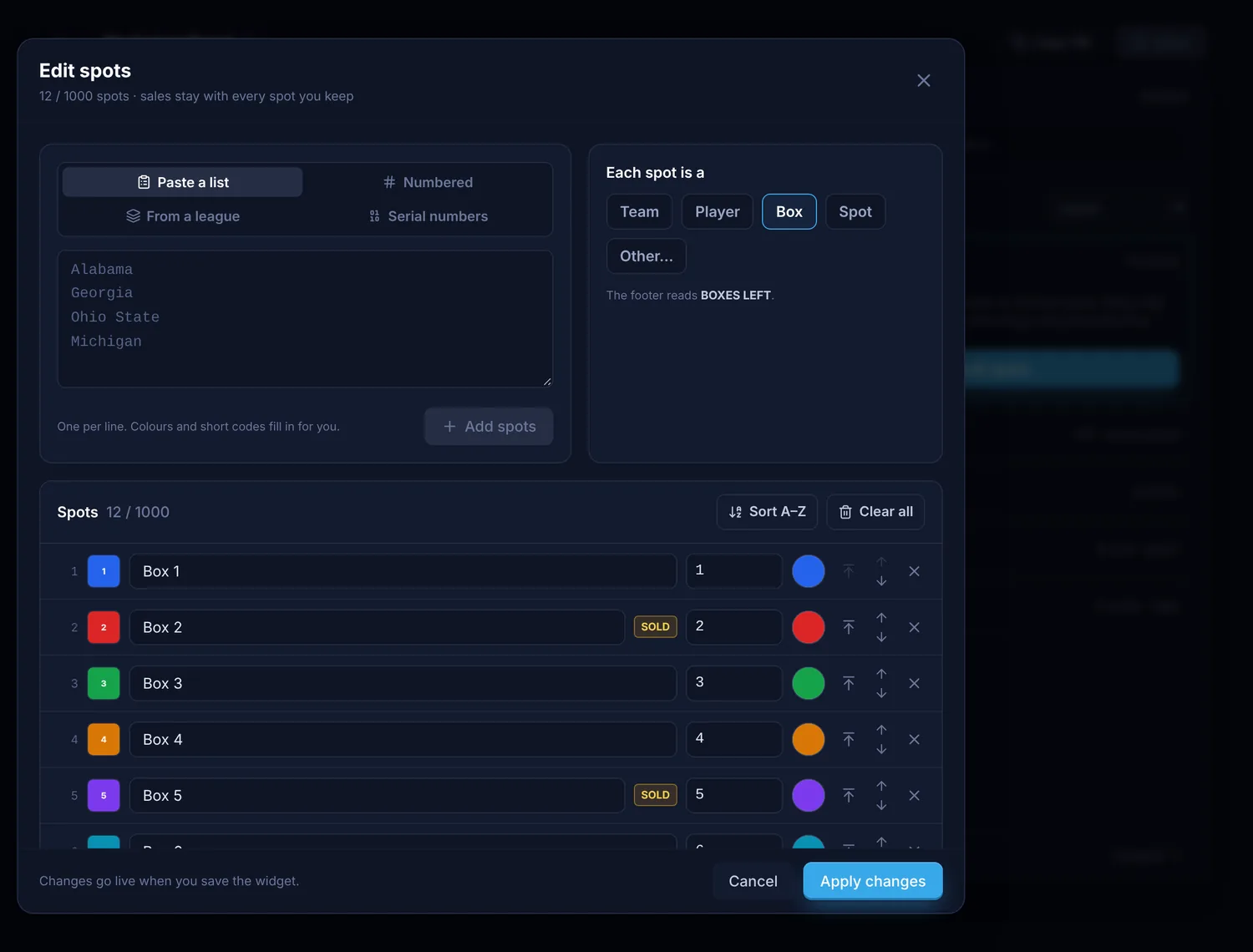
Add, rename, recolour, reorder or remove spots. Sales stay with every spot you keep. Removing a spot that's already sold asks you first, so you can't take a sold spot off by accident. Select Apply changes, then Save.
Quick answers
What is a serial number break? A break where buyers buy a team and a last digit, usually 0 to 9. Each buyer gets that team's numbered cards whose serial number ends in their digit.
What is a box break? A break where each buyer buys one box from a case, and everything pulled from that box is theirs.
What is a pack break?
A break where each buyer buys a pack, often by number. Build it with Numbered: Pack 1 to however many packs you're opening.
How many spots can a custom board have? Up to 1,000. Boards over 100 spots start with pages on, so each spot stays readable on stream.
Can I add spots after I've started selling? Yes. Edit spots keeps every sale on the spots you keep.
Can I run a Pokémon break or a player break this way? You can, but there are boards made for both: the Pokémon type break board and Player Breaks, which builds the board from the product's checklist.
Do I need Pro? Yes. Building your own board is a Pro feature, and it's included in the 7-day free trial.